

Enhance virtual meetings with AI-driven noise cancellation and recording.
Gallery
1 item
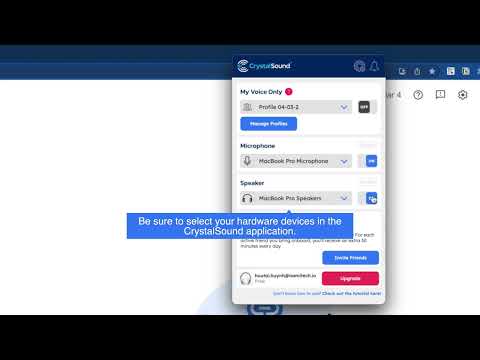
About CrystalSound
Key Features
- Advanced AI noise cancellation for both microphone and speaker
- Bidirectional audio recording for accurate meeting minutes
- On-device processing ensures 100% data privacy
- Seamless integration with Zoom, Teams, and Google Meet
- My Voice Only technology to isolate the speaker's voice
Pros and Cons
Pros
- Drastically improves audio clarity in noisy environments.
- User-friendly integration with popular conference tools.
- Privacy-focused design with local data processing.
- Enhances productivity with distraction-free communication.
Cons
- Initial setup may be challenging for non-technical users.
- Limited customization options for noise cancellation intensity.
- Occasional sound leakage reported in some environments.
Pricing
Connect with CrystalSound
Frequently Asked Questions
The 'My Voice Only' feature uses AI to isolate and enhance your voice while minimizing background noise. It analyzes audio patterns to differentiate your voice from others, focusing on clarity for your speech. While prioritizing your voice, it strives to maintain a natural audio experience for other participants, but extremely loud or overlapping noises might still be slightly audible.
The free trial of CrystalSound offers a limited duration for recordings and a capped number of meetings you can enhance with noise cancellation each month. Upgrading to the Pro tier, starting at $4.8/month, unlocks unlimited recording time and removes the cap on the number of meetings you can enhance, providing full access to CrystalSound's features.
While the audio processing happens locally on your device to ensure privacy, CrystalSound still requires an internet connection for initial setup, license validation, and occasional feature updates. The core noise cancellation and 'My Voice Only' functionalities operate offline once the software is activated and the AI models are loaded.
While CrystalSound provides seamless integration with Zoom, Teams, and Google Meet, you can still use it with other conferencing platforms by setting CrystalSound as your default microphone and speaker in your operating system's audio settings. This ensures all audio processed by your system, including audio from other conferencing platforms, will benefit from CrystalSound's noise cancellation.
Yes, CrystalSound provides video tutorials and step-by-step guides on our website (https://crystalsound.ai) to assist users with the initial setup, specifically for Zoom and other supported platforms. These resources cover everything from installation to configuring audio settings to ensure optimal performance and seamless integration, making the process easier for non-technical users.
Similar AI Tools to CrystalSound

Mindverse
Your personalized AI second brain for smarter workflows and autonomous agents.

Langotalk
Master languages 6x faster with personalized AI conversation partners
Essence App
Optimize productivity and well-being with cycle-synced AI insights

Socratic by Google
Unlock your learning potential with Google's AI-powered study companion.

Jigso
Your AI-powered workplace sidekick for seamless task automation and data retrieval.